100% Security
Instant Download 24/7
10+ Years of Service

Need Some Help?

All orders are provided by download and immediately upon ordering. More questions? If we're online, reach our to us on the Store Live chat located bottom right. Also see Questions and Answers. If we're offline, contact our Support team from the Contact Us page.

0 Reviews
$89.99
$99.99
Save 10%

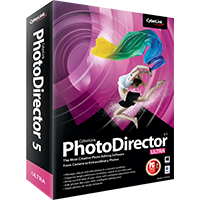
CyberLink PhotoDirector 5 Ultra

Need Some Help?

All orders are provided by download and immediately upon ordering. More questions? If we're online, reach our to us on the Store Live chat located bottom right. Also see Questions and Answers. If we're offline, contact our Support team from the Contact Us page.

+ login to earn points
Platform
macOS
Windows 7 (32 bit)
Windows 7 (64 bit)
Windows 8
Windows Vista
Windows XP
Version
5
Manufacturer
Twitter
Last Updated
15 January 2021
Download Size
590.00 KB

PhotoDirector 5 is a capable tool for organising, editing and sharing your digital images.

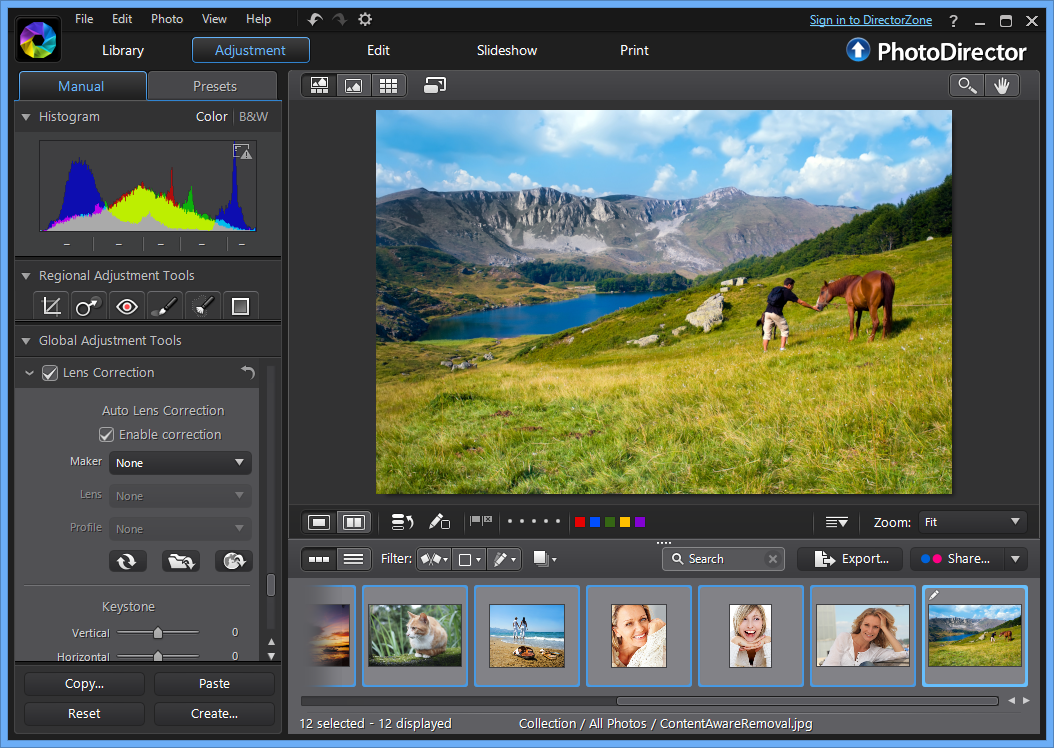
Launch the program and you'll find it's split into five sections.

"Library" is where you import, view, rate, tag and generally organise your photos. There are plenty of time-saving tools on hand (face tagging, the ability to exclude duplicates when importing), but it's all very straightforward and easy to use.

The "Adjustment" section provides manual and fully automatic tweaks for colour, white balance, sharpness and more, as well as crop and rotate tools, various healing brushes and a red-eye remover.

The "Edit" tab then ramps up the creative possibilities with a range of more powerful tools. The People Beautifier provides options to whiten teeth, remove wrinkles, perhaps reshape your subjects for a more slimline look. The program can remove unwanted objects from pictures, automatically filling in the background. There are some simple effects, frames, a watermarking tool, and more.

When you're finished your work, the "Slideshow" section helps turn your photos into a video file, or a slideshow you can share directly on YouTube. And the "Print" tab provides a great deal of control over any printouts you might want to make.

PhotoDirector 5 extends all this with a new Lens Correction tool. If a photo is distorted, this can read its metadata, choose the appropriate lens profile and correct the image automatically. There are only 60 profiles built in, but you can download others from CyberLink's DirectorZone, if necessary.

Smarter noise reduction is another adjustment highlight, with the program now better able to remove noise automatically, as well as restoring textural detail which might otherwise be lost.

And the new Tone Curves allow you to adjust the contrast of the photo by individual colour channels.

Photo organisation has been improved with the introduction of Stacks. These allow you to group together sets of images within a folder: the photos you took on a particular day, perhaps. If you have 500 photos in a folder then this will help cut down your scrolling, and make it easier to find the shots you need, yet the photos themselves remain in the same folder for easy management elsewhere.

Elsewhere, there's new support for HDR bracketing (merge up to 5 shots into one HDR image) and split toning (apply one colour tone to the highlights, another to the shadows).

And there are a range of smaller, more general additions which should appeal to everyone. Native 64-bit support; 2K and 4K HD video slideshows; an optimised JPEG and RAW decoder (RAW images are now imported up to 3 times faster than before); even a new Windows 8 app, PhotoDirector Mobile, which allows you to take photos and edit them right away.

We're not talking about revolutionary change here, then, but there's still plenty to enjoy, particularly the lens correction. If you're an existing user, or just looking for a powerful but user-friendly tool for managing and editing your photo collection, PhotoDirector 5 is worth a look.

Please note that the Windows trial version here will download a 1MB CyberLink downloader stub, which will then proceed to download the main application from the CyberLink servers. The trial version here is Windows only. Both Mac and Windows will receive a full build after purchase.

Review by Mike Williams.

Special Information

Note that the trial version here is Windows only. Mac and Windows will receive a full build after purchase.

Frequently Asked Questions

Find quick answers to the most common questions about our services and platform

How Do I Order Software?
Simply select the software you want to order by clicking the "Buy Now" button or, where the option exists, clicking on "Upgrade". The upgrade option enables you to upgrade from a previous version of the software. When you click "Buy Now" you will be taken to your shopping cart, powered by Cleverbridge, where you can choose a payment option and then receive your download and serial code within seconds, after making your payment.
What Is The Extended Download Insurance?
When you order software online, you receive a digital download and a serial code by email. You normally have 30 days from placing the order to download your software, if you need to download again in the future. You can choose to extend this to two years, enabling you to login to your account and find your download, serial code(s) and your original invoice. Ideal if you need to re-install your software, suffer from a system crash or buy a new PC. Simply had to the "My Account" section on this store - or any one of our worldwide stores - to access previous orders.
Do I Need A Backup CD?
No, although some people like to receive a copy of their software on a CD which they can store indefinitely. We provide a backup CD for some applications in the store. For example, we can provide an official colour booklet and installation/backup CD for AVG and Kaspersky software ordered through the store. Some software suppliers, such as Nitro PDF and Paragon Software, will supply you directly with a backup CD if you include this with your order.
Why Are Some Prices Dynamic?
If you are based in New Zealand and you see prices in NZD, you may see a different price in your checkout than we advertise in the store. There's a good reason for this - software suppliers set their prices in USD, GBP and EUR, with NZD and other prices calculated based on the exchange rate and often between USD and NZD. Therefore some prices may be slightly cheaper or more expensive than the advertised price as the prices in the checkout are calculated, on-the-fly, from USD. This does not apply to customers in the EU, UK, US, Canada and Australia.
Why Was My Card Declined?
In most instances this will be due to fraud protection from your credit card provider. Although you have protection when you purchase goods, online, through your credit card, your company may decline a large order or an order made through an online store for the first time. If your card is declined, we suggest you speak with your card provider and/or your bank. You can also pay through PayPal, wire transfer or other payment formats.
Can I Ask For A Refund?
We strongly suggest you download and test trial software before placing your order. Trial software is provided to enable you to determine whether it's applicable for your system and meets your requirements. Once you are happy with your trial software, place an order. Digital downloadable software often cannot be refunded unless the order was placed in error. Activated software cannot be refunded as the code becomes the property of the customer and cannot be resold or reused. If you ordered in error or there is another problem with your order, contact PayPro directly for a refund.
Who Keeps Our User/Order Information?
Your transaction is between yourself and e-commerce providers PayPro. PayPro will NEVER re-use your information, pass on to a third party and will not contact you unless you contact them with a query. Your credit card information is not kept on file and is not stored by any third party. If you ordered Extended Download Insurance with your order, we retain basic information about your order on our secure server. This includes your name, email address (required to access your account), serial codes ordered and download links to your software. No-one has access to this information apart from yourself. This information is only available once you have registered your account using the email address you used to place the order.

Write a review

Find What You Need!
Payment Methods
Trusted Partners
Norton Kaspersky Avast Software Auslogics O&O Software McAfee
100% Security
Instant Download 24/7
10+ Years of Service